The Windows Azure public cloud platform is one of the three pillars of Microsoft’s Cloud OS vision that will transform the traditional datacenter environment, help businesses unlock insights in data stored anywhere, enable the development of a wide range of modern business applications, and empower IT to support users who work anywhere on any device while being able to manage these devices in a secure and consistent way. The other two pillars of the Cloud OS are, of course, Windows Server 2012 R2 and Microsoft System Center 2012 R2. In order to facilitate the involvement of IT Pros. with the first pillar Microsoft released this book.
Showing posts with label Windows Server 2012. Show all posts
Showing posts with label Windows Server 2012. Show all posts
Tuesday, October 1, 2013


Sunday, October 7, 2012
Windows Server 2012 licensing jargon !
As Microsoft released Windows Server 2012 , and as it changed the available editions to be as below :
Edition
Ideal for...
High Level Feature Comparison
Licensing Model
Datacenter
Highly virtualized private & hybrid cloud environments
Full Windows Server functionality with unlimited virtual instances
Processor + CAL*
Standard
Low density or non-virtualized environments
Full Windows Server functionality with two virtual instances
Processor + CAL*
Essential
Small business environments
Simpler interface, pre-configured connectivity to cloud based services; no virtualization rights
Server (25 User Account Limit)
Foundation
Economical general purpose server
General purpose Server functionality with no virtualization rights
Server (15 User Account Limit)
*CALs are required for every user or device accessing a server directly or indirectly. See the Product Use Rights for details

It is advisable to go and read more about the new licensing model , here are some of the crash sheets for the new Windows Server 2012 licensing model :
Wednesday, September 12, 2012
Windows Server roles and features duplication on multiple servers using PowerShell
In the process of servers preparation you may have multiple servers which will play the same role and thus require installation of the same Windows Server role(s) , role service(s) and feature(s) .
Most of admins do it the hardest way , by installing the role(s) , role service(s) and feature(s) names(s) for each server using Server Manager 
An alternative way to be used is to install all required role(s) , role service(s) and feature(s) on a single server , export it to .XML file and then use the exported file to automate installation of the remaining servers .
Here is how to do :
- Source Server Preparation : Install the required role(s) , role service(s) and feature(s) normally on one server using the traditional way ( Server Manager )
- Once installation is completed , start an elevated Windows PowerShell Modules

Saturday, September 8, 2012
.Net Framework 3.5 requires alternate source path when installing on Windows Server 2012 !!
Recently , I was working on installing a new Windows Server 2012 and as soon as I tried to do .Net framework 3.5 installation with Server manager ( as below ) , I got a notification for .Net framework 3.5 installation asking for specifying alternate source path for installation package(s).
I noticed a link at the bottom “Specify an alternate source path” , upon clicking a window opened explaining the situation and allow giving of the alternate source path .


Saturday, September 1, 2012
Windows 2012 MS free book ( RTM edition update )
As I posted earlier for the free book by Microsoft about Windows Server 2012 while it was beta , now I am posting for its RTM update.

this book is a great way to get quickly skilled up on all the new improvements in this latest Windows Server - one of the most ambitious releases of Windows Server for IT Pros since Active Directory was released in Windows Server 2000! In this 256-page eBook, you'll find 5 chapters of detailed technical content covering the following key improvements to building a Private Cloud at your shop with Windows Server 2012 ; here is what included :
Thursday, August 30, 2012
DHCP resiliency with Windows Server 2012 ; Awesome !!
DHCP is designed to reduce the administration burden and complexity of configuring hosts on a TCP/IP-based network, such as a private intranet. Using the DHCP Server service, the process of configuring TCP/IP on DHCP clients is automatic .
Windows Server 2008 R2 provided two mechanisms for DHCP server role resiliency , as follow :
DHCP in a Windows failover cluster. This option places the DHCP server in a cluster with an additional server configured with the DHCP service that assumes the load if the primary DHCP server fails. The clustering deployment option uses a single shared storage. This makes the storage a single point of failure (SPoF), and requires additional investment in redundancy for storage. In addition, clustering involves relatively complex setup and maintenance.
Split scope DHCP. Split scope DHCP uses two independent DHCP servers that share responsibility for a scope. Typically 70% of the addresses in the scope are assigned to the primary server and the remaining 30% are assigned to the backup server. If clients cannot reach the primary server then they can get an IP configuration from the secondary server. Split scope deployment does not provide IP address continuity and is unusable in scenarios where the scope is already running at high utilization of address space, which is very common with Internet Protocol version 4 (IPv4).
Monday, August 27, 2012
Error “FX:{6FBE5D92-C65A-41DC-AEBF-09D8845F68A1}” launching VAMT 3.0 installed on Windows Server 2008 R2
As I was installing Volume Activation Management Tool ( VAMT ) for Windows 8 activation and as soon as installation finished , I went to open the console for VAMT 3.0 when I crashed with FX:{6FBE5D92-C65A-41DC-AEBF-09D8845F68A1} , as shown below :


Sunday, August 26, 2012
Windows 8 activation with VAMT – Part II
In a previous post I showed that Volume Activation Management Tool which can be used for Windows 8 activation is now a part of what called Windows Assessment and Deployment Kit ( ADK ) .
In this one , I will show to you can perform installation of VAMT , so you can use it for Windows 8 activation .
First of all , download ADK installation file for Windows 8 from Here

Once completed , start the installer adksetup.exe and proceed as follow :
- You can go with either options below ( for me I will go with Install )
- Install : To perform direct installation of the required feature(s) on the local system and hence streams required components download
- Download : To download the required components to do installation on another system
-

Windows 8 activation with VAMT – Part I
Few days ago, I was working with our company Windows 8 Enterprise Key as we are going to perform OS upgrade for our internal PCs. I went to test our Volume License Key with the nifty Volume Activation Management Tool 2.0 ( VAMT ) , but whenever I tried to add our key to the tool I got the error message as below ( Invalid character in the product key ) , you can test it yourself with the N character :

So my workmate Ramy – our System Center guy - said “Maybe there are a new VAMT version for Windows 8 ?” . At this stage I started to check on TechNet to look for a new version of VAMT when I found the follow :
With the release of Windows 8 and Windows Server 2012 , Microsoft released The Windows® Assessment and Deployment Kit (Windows ADK) which contains all of the tools that you need to customize, assess, and deploy Windows operating systems to new computers.
Sunday, July 29, 2012
Performance Tuning Guidelines for Windows Server 2012
While waiting for the final release of Windows Server 2012 Microsoft recently released Performance Tuning Guidelines for Windows Server 2012 .This 148 pages guide describes important tuning parameters and settings that you can adjust to improve the performance and energy efficiency of the Windows Server 2012 operating system. It describes each setting and its potential effect to help you make an informed decision about its relevance to your system, workload, and performance goals.

This guide is for information technology (IT) professionals and system administrators who need to tune the performance of a server that is running Windows Server 2012.
Tuesday, July 17, 2012
Microsoft Assessment and Planning (MAP) Toolkit 7.0
As Windows Server 2012 / Windows 8 are coming soon ( RTM by August 2012 ) , I received an email from Microsoft announcing that Microsoft has released the new version ( 7.0 ) of Microsoft Assessment and Planning toolkit , which provides organizations with tools to assess readiness for Windows Server 2012 and Windows 8.

Microsoft Assessment and Planning (MAP) 7.0 provides you with the capabilities that allows you to :
Wednesday, July 11, 2012
Converting Windows Server 2012 from a Server Core to a Full Server ( with GUI ) and vice versa
Windows Server 2012 comes in both Core & Full ( with GUI ) flavors as its successor Windows Server 2008 . A great enhancement that comes with Windows Server 2012 is the ability to convert from one to the other . In this post I demonstrate how to perform these conversions.
From Windows Server 2012 Core to Windows Server 2012 Full ( with GUI ) :
At Windows Server 2012 Core edition CMD perform the following steps :
1 ) Create a directory to which Windows image will be mounted :
MkDir C:\MountDir

2 ) Determine the index number for a Server with a GUI image ( Mine is DataCenter )
Dism /get-wiminfo /wimfile:<drive>:sources\install.wim

3 ) Mount the WIM file using this command at an elevated command prompt ( D:\ refers to my Windows Server 2012 DVD ) :
Dism /mountwim /WimFile:<drive>:\sources\install.wim /Index:<#_from_previous_step> /MountDir:c:\mountdir /readonly
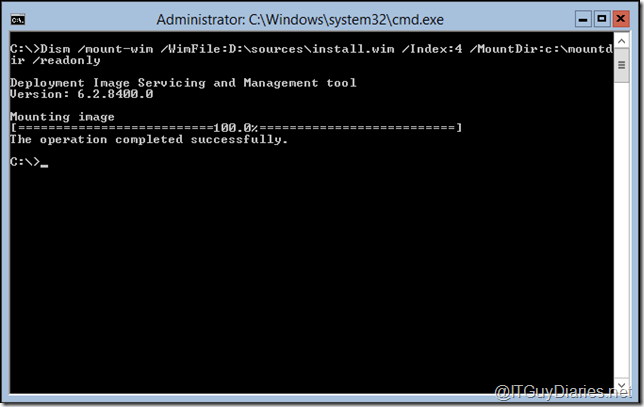
4 ) Finally , from CMD start Windows PowerShell , then execute the following cmdlet :
PowerShell ( Enter )
Install-WindowsFeature Server-Gui-Mgmt-Infra,Server-Gui-Shell –Restart –Source C:\mountdir\windows\winsxs
| | |
| | |


Once completed , automatic restart will be performed , the magic spell works and our Windows Server 2012 is with GUI

From Windows Server 2012 Full ( with GUI ) to Windows Server 2012 Core :
This is a single step action , all you need is to execute the following cmdlet at an elevated Windows PowerShell window :
Uninstall-WindowsFeature Server-Gui-Mgmt-Infra –restart
 |  |
Once completed , automatic restart will be performed , the magic spell works and our Windows Server 2012 is Core
In addition , here are the steps for installation for a Windows Server 2012 Core flavor :
| | | |
| | | |
 |  |  |


If you want to install Windows Server 2012 with GUI chose the other option at the third screenshot ( count from left ) . awesome , isn’t ?

Wednesday, June 27, 2012
Windows Server 2012 Jump Start: “Preparing for the Datacenter Evolution” videos are now available on TechNet
Windows Server 2012 is the upcoming release from Microsoft for servers OS . On June 20-21, 2012 , Microsoft Learning partnered with the Microsoft Server and Tools team and Developer and Platform Evangelism (DPE) delivered the “Windows Server 2012 Jump Start: Preparing for the Datacenter Evolution” .

By now Microsoft announced that the HD-quality video recordings available on TechNet Videos !
Saturday, June 16, 2012
System Center 2012 Service Pack 1 CTP2 is here
This Community Technology Preview (“CTP2”) enables System Center customers to jointly evaluate System Center 2012 and Windows Server 2012 Release Candidate. CTP2 includes updates and enhancements to the following System Center 2012 components:
- Virtual Machine Manager
- Improved Support for Network Virtualization
- Extend the VMM console with Add-ins
- Support for Windows Standards-Based Storage Management Service, thin provisioning of logical units and discovery of SAS storage
- Ability to convert VHD to VHDX, use VHDX as base Operating System image
-
- Configuration Manager
- Support for Windows 8
- Support for Mac OS clients
- Support for Linux and Unix servers
- Data Protection Manager
- Improved backup performance of Hyper-V over CSV 2.0
- Protection for Hyper-V over remote SMB share
- Protection for Windows Server 2012 de-duplicated volumes
- Uninterrupted protection for VM live migration
- App Controller
- Service Provider Foundation API to create and operate Virtual Machines
- Support for Azure VM; migrate VHDs from VMM to Windows Azure, manage from on-premise System Center
- Operations Manager
- Support for IIS 8
- Monitoring of WCF, MVC and .NET NT services
- Azure SDK support
- Orchestrator
- Additional support for Integration Packs, including 3rd party
- Manage VMM self-service User Roles
- Manage multiple VMM ‘stamps’ (scale units), aggregate results from multiple stamps
- Integration with App Controller to consume Hosted clouds
- Service Manager
- Apply price sheets to VMM clouds
- Create chargeback reports
- Pivot by cost center, VMM clouds, Price sheets
- Server App-V
- Support for applications that create scheduled tasks during packaging
- Create virtual application packages from applications installed remotely on native server
You can download it from here . In addition , you can get technical documentation from here
Monday, June 4, 2012
Introducing Windows Server 2012 [ A free MS Press Book ]
Today , Microsoft Press released a free – five chapters – book that introduce the latest version of Microsoft Windows Server 2012.

Here is the book’s table of contents :
Chapter 1 : The business need for Windows Server 2012
- The rationale behind cloud computing Making the transition
- Technical requirements for successful cloud computing
- Four ways Windows Server 2012 delivers value for cloud computing Foundation for building your private cloud
Chapter 2 : Foundation for building your private cloud
- A complete virtualization platform
- Increase scalability and performance Business continuity for virtualized workloads
Chapter 3 : Highly available, easy-to-manage multi-server platform
- Continuous availability
- Cost efficiency
- Management efficiency
Chapter 4 : Deploy web applications on premises and in the cloud
- Scalable and elastic web platform
- Support for open standards
Chapter 5 : Enabling the modern workstyle
- Access virtually anywhere, from any device
- Full Windows experience
- Enhanced security and compliance

Saturday, June 2, 2012
Domain Controller Cloning with Windows Server 2012
Windows server 2012 brings a set of new features and capabilities that will make IT admins life easier . In this post I will demonstrate Virtualized Domain Controller ( VDC ) as a new innovative way to create additional domain controllers.
VDC is a technique that allows you to simply get a new – cloned - virtualized domain controller from another virtualized one without going into the hassle of OS installation , OS patching and domain controller promotion.
In order to perform VDC – clone a domain controller – some condition must be justified , as below :
- PDC emulator FSMO role are located at a Windows Server 2012 RC DC
- PDC emulator available during cloning operations [ PDC emulator DC cannot be used for DC cloning ]
- The Hyper-V host must be joined the same domain
- The source Windows Server 2012 RC domain controller cannot have been previously migrated from FRS to DFSR for SYSVOL
| Hostname | Roles | IP | Mask | DNS |
| ITGD-HV01 | Hyper-V | 10.10.10.10 | 255.255.255.0 | 10.10.10.11 | 10.10.10.12 |
| ITGD-DC01 | ADDS & DNS | 10.10.10.12 | 255.255.255.0 | 10.10.10.11 | 10.10.10.12 |
| ITGD-DC02 | ADDS & DNS | 10.10.10.12 | 255.255.255.0 | 10.10.10.12 | 10.10.10.11 |
- ITGD-DC01 : Holds PDC emulator operation master
- ITGD-DC02 : To be cloned domain controller
- To clone ITGD-DC02 to a new virtualized domain controller [ ITGD-DC03 ]
Friday, June 1, 2012
Windows 8 ( RP ) and Windows Server 2012 ( RC ) are here !
At Japan's Developers Day conference, Steven Sinofsky announced that the Windows 8 Release Preview (build 8400) will be available by first week of June . By now Windows 8 Release Preview ( RP ) and Windows Server 2012 Release Candidate ( RC ) are available for download.

- Windows 8 - Release Preview ( RP )
This is our Microsoft’s pre-release, and includes Windows 8, Internet Explorer 10, new Windows 8 apps for connecting to Hotmail, SkyDrive, and Messenger (and many more), and hundreds of new and updated apps in the Windows Store.
Here below some of the newly improved aspects ( abstracted from Steven Sinofsky’s post at Building Windows 8 blog ) :
Subscribe to:
Posts (Atom)